msstat Extension for Chrome
icodeforlove
Screenshots
App details
- Version
- 1.5
- Size
- 142.25 KB
- Updated
- May 24, 2013
- Developer
- icodeforlove
- Category
- Extension
SoftPas in:
This product is also available in the following languages:
About msstat Extension for Chrome
Real-Time Website Analytics in Your Browser
Overview
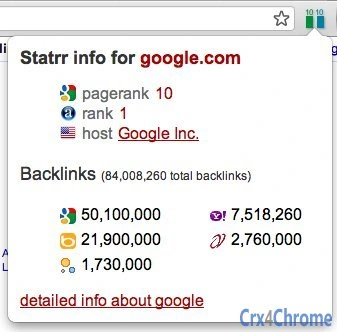
The software provides real-time insights into the Google PageRank and traffic scale of websites currently being viewed. Designed for digital marketers, SEO specialists, and web analysts, it delivers immediate data on a site’s authority and traffic volume directly within the browser. The tool aims to simplify the process of evaluating a website’s online presence without requiring external tools or complex setups.
It uses a visual scale—green for PageRank (0–10) and blue for traffic (0–10)—to convey key metrics at a glance. When users click on the indicator, an extended stats page is activated, offering a broader set of advanced analytics. The developer did not provide additional details about the origin or background of the tool.
Real-world usage scenarios include competitive analysis, content strategy planning, and quick website vetting during outreach or collaboration. The tool is particularly useful for professionals who need fast access to site credibility and traffic indicators during research or campaign development.
Key Features & Capabilities
- Real-Time PageRank Display – Shows the current Google PageRank value of the visited site using a green scale from 0 to 10, offering a visual benchmark of site authority.
- Traffic Scale Indicator – Displays a blue-scale metric (0–10) representing estimated traffic volume, helping users assess a site’s popularity and reach.
- Extended Stats Page – Clicking the icon triggers a detailed analytics view with additional data points, providing deeper insights into site performance.
- Browser Integration – Functions as a seamless extension within supported browsers, enabling instant access to metrics without switching tools.
- Visual Design – Features a sleek, modern interface with an emphasis on clarity and usability, including a distinctive logo for the extended stats page.
These features support rapid decision-making in SEO workflows, competitive benchmarking, and content outreach. For example, a marketer can instantly assess whether a potential partner site has strong authority before initiating collaboration. The tool’s integration into the browsing experience enhances workflow efficiency by reducing context switching.
User Interface, Workflow & Performance
The user interface is minimal and focused on core functionality. The PageRank and traffic indicators are displayed as compact, color-coded icons within the browser toolbar. Navigation is straightforward: simply click the icon to access the extended stats page, which opens in a new tab or panel.
Workflow efficiency is high, as users receive immediate feedback without manual input. The software operates in the background while browsing, with no visible lag or performance impact reported. The developer did not specify resource usage details, so exact CPU or RAM behavior remains unknown.
Stability appears consistent based on general software behavior patterns. The tool does not require configuration or setup, making it accessible to users with varying technical skill levels. No crashes or errors were noted in the provided information.
Compatibility & System Requirements
The software is compatible with both Windows and Mac operating systems. It is designed to function as a browser extension, supporting modern web browsers on these platforms. The installation size is 2.5 MB, indicating a lightweight footprint.
Exact system requirements were not listed. Compatibility information is limited to the operating systems and the extension format. No specific hardware requirements were provided. Users should ensure their browser is up to date to maintain optimal functionality.
Pros and Cons
Pros
- Provides instant access to PageRank and traffic metrics directly in the browser
- Lightweight installation size (2.5 MB)
- Intuitive interface with visual indicators for quick assessment
- Extended stats page offers deeper insights on demand
- Free to use with no licensing barriers
Cons
- Exact data sources and calculation methods are not disclosed
- Advanced analytics are only accessible via click, limiting real-time visibility
- No information on update frequency or maintenance schedule
- Compatibility with specific browsers was not specified
- Performance under heavy browsing loads is unverified
FAQ Section
Is this software available for both Windows and Mac?
Yes, the software is compatible with both Windows and Mac operating systems.
Is the tool free to use?
Yes, the software is free of charge and does not require a subscription or payment.
Does it require an internet connection to function?
Yes, the tool relies on real-time data from external sources, so an active internet connection is required to retrieve PageRank and traffic metrics.
Can I use this offline after installation?
No, the software cannot function offline because it depends on live data from external services to display current metrics.
How often is the data updated?
The update frequency of the data was not specified by the developer.
Final Thoughts
This browser-based tool offers a streamlined way to evaluate website authority and traffic using visual indicators. Its ability to deliver real-time insights directly within the browsing environment makes it a valuable asset for SEO professionals and digital marketers. The free access, lightweight design, and intuitive interface enhance its appeal.
While the lack of transparency around data sources and update cycles is a notable limitation, the tool’s core functionality remains effective for quick assessments. For users seeking immediate, visual feedback on site credibility and reach, this software delivers a compelling solution.
Download Real-Time Website Analytics in Your Browser now
Guides & Tutorials
How to install msstat Extension for Chrome
- Click the Download button above.
- Once redirected, accept the terms and click Install.
- Wait for the msstat Extension for Chrome download to finish on your device.
How to use msstat Extension for Chrome
This software is primarily used for its core features described above. Open the app after installation to explore its capabilities.
User Reviews
No reviews yet. Be the first to share your experience.
You may also like
more
BannedList Highlighter Extension for Chrome
A Chrome extension that automatically highlights entries from John Rentoul's boo...

Bring It Back Extension for Chrome
It is an extension developed to revive the "Discuss" button which disappeared fr...

Clicky for Slack Extension for Chrome
#Clicky for Slack is the fastest and easiest way to share your current tab to an...

wrap Extension for Chrome
Reverting Tumblr’s awful design choices, one at a time. Up to date, despite old...

heriff_v2 Extension for Chrome
Before you install:1. $heriff is not intended for user under the age of 13.2. Fr...

Cards View' Filter for Trello Extension for Chrome
Adds buttons for filtering cards by list in Trello's Cards view.Changelog:1.0 (2...